
Process Safety
It is a digital solution launched in the form of an application built exclusively for the factory production or operation manager to keep an eye on the machinery’s safety from his desk.
About the Project
Process Safety was a project primarily executed for a client called Syngene. This was an ad hoc requirement that emerged from Syngene and was taken up as a sidelined initiative. The project was completed within a tight timeline of just four months through close collaboration with product owners, the sub-segment head, and architects—focusing exclusively on the Syngene factory ecosystem.
The entire application was ideated based on clear use cases, directly addressing the client's specific pain points.
Problem Statement
In any factory shop floor, the production or operation manager takes the responsibility in looking after the safety of its process in production. But at times in a huge factory setup it’s difficult to track all the machinery in one go, even if it's found and it’s not easy to physically reach the machinery spot to save from the damage.
Benefits
-
It will reduce production manager’s physical effort
-
It will help the user to track the status, levels and parameter values remotely
-
It will help to keep a track of all the machinery on the factory floor in one go
-
It will help to take decisions even before the actual damage happens
-
It will help to locate the damaged machinery
-
It will help to prompt the reason for the damage
-
It can be helpful for any kind of Industry
-
If it’s a huge factory located in multiple locations, this solution can be useful for all locations having different machinery types
How it works
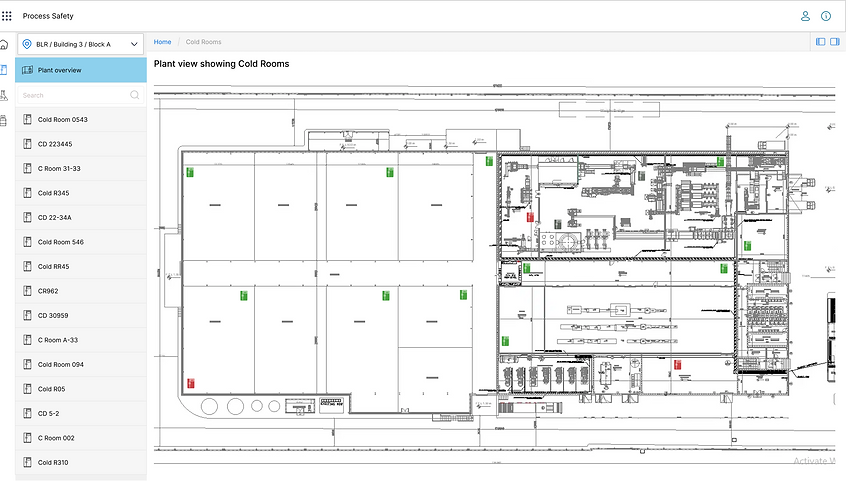
User has to upload the factory floor set up plan into the application and configure the type of machinery to be tracked on the floor. Users can set the threshold values of each machinery type so that he/she can receive notifications once the actual values go beyond the threshold limits.

Visualization with usecase

Design Process

Low Fidelity Mockups
After having multiple discussions with the team to freeze requirements. Finalized the below version of Mockup screens developed by using Balsamiq considering all the usecases. Below are the mockups that are done in 5th iteration.


Final screens
Below are final screens done in Figma, this being the customer project have received the requirement doc with all the user needs. Developed the below screens accordingly.



Next Steps
We have received a positive feedback from the customer and now we wanted to provide more convenient options for the users by integrating with our existing notification API so that user can receive the critical alerts or notifications directly on their Mobile phone via SMS and Email. This will help the operation manager to take quick actions when not around the factory.